Bafang basic settingsLink
Accessible from menu Bafang Basic.
ButtonsLink
Initialize - Reads all Bafang Basic/Pedal/Throttle settings at once. After this procedure both Road/OffRoad would have identical settings.
Road or OffRoad - switch between profiles.
Read controller - reads Bafang Basic settings.
Info - provides information for the Bafang switch mode.
Write - writes the Basic settings to controller. If the operation is successful it updates the settings on the display as well.
BATTERY SETTINGSLink
Attention
Please use settings in the range for your motor for Low Battery Protect and Limited Current. Each controller has its own hardware limitations which cannot be bypassed. The controller will reject values outside its capabilities.
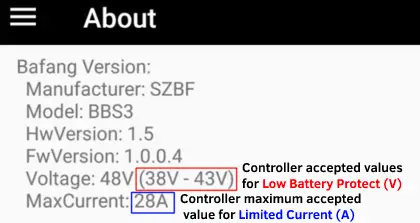
Example of Bafang controller limitsLink
This can be found in the EggRider app About page.
Low battery protect (V)Link
Value to prevent battery voltage cutoff (most likely your battery will have a BMS that will shut off power when the voltage gets too low). If your battery shuts down before reaching this value you should increase it.
If you get Low Battery Protect (V) error, it means you are outside your controller accepted limits. Following the example picture above you can set values between 38V and 43V.
Limited current (A)Link
Represents the global current limit in amperes (A). This sets the maximum power the drive unit will draw from the battery pack.
The current limit directly affects your bike's overall power, as shown in the following formula:
Battery voltage (V) * Current limit (A) = Power (W) (For example: 48V * 20A = 960W)
If you get a Limited Current (A) error, it means you are outside your controller's accepted factory limits. Following the example picture above, you can set a maximum value of up to 28A.
Attention
On certain bafang motors, the controller only reads the Low Battery Protection and Limited Current settings upon a full system restart. Because of this software limitation, switching profiles while riding will not update these two values. To avoid unexpected behavior, you must keep these values identical for both your Road and OffRoad modes.
Workaround: To achieve different power or speed behaviors between modes without restarting your bike, keep the global Limited Current identical in both profiles, and instead adjust the Assist Limited Current (%) and Assist Limited Speed settings individually for each mode.
Assist levels mappingLink
Each row defines the current limit and speed limit for the corresponding assist level.
Tip
To have no power on Level 0, set both Current and Speed Limit to 0. In some cases it is required a value of 1.
AssistLink
Identifies the assist level
Limited current(%)Link
The percentage of the current from the Limited current (A).
For example if your bike has 250W and you set this setting to 50% you will have 125W. If you set it to 100% you will have 250W.
Limited Speed(%)Link
The percentage of the speed limit.
Cases
- If Speed Limit is set to a value on Bafang Pedal or Bafang Throttle pages, then the percentage is from that value.
- If Speed Limit is set to Display command, then the percentage is from the Max Speed Road or Max Speed OffRoad.
OTHERSLink
Wheel diameter (Inch)Link
Speed meter modelLink
Options
- External, Wheel Meter
- Internal, Motor Meter
- By Motor Meter
Speed meter signalLink
The number of magnets per one wheel revolution, default 1.